
Image Translation Methodology
TranslatePhoto.org keeps image preparation, text recognition, translation, and review as separate stages. You receive the OCR source text beside the translation so you can find where an error entered before using the result.
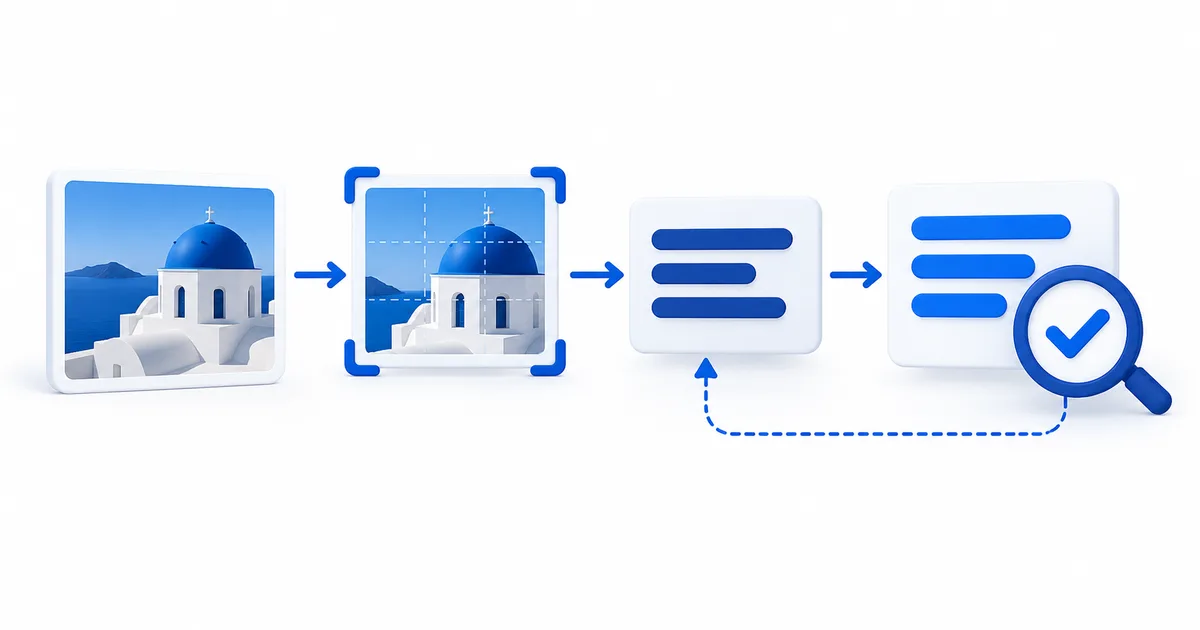
From uploaded image to reviewable translation
The service does not ask one system to interpret the whole image and return an unexplained answer. It prepares the file, extracts the visible source text, translates the recovered text, and displays both text records. Each stage has a different input, output, and failure mode.
Image preparation
The server validates the file, corrects stored orientation, controls decoded dimensions, and produces a consistent JPEG for recognition.
Output: normalized imageOCR extraction
The text recognition stage reads visible characters and returns source text. It does not prove that every field or line order is correct.
Output: editable source textText translation
The translation stage receives the OCR text and requested target language. It is instructed to translate the supplied text without adding facts.
Output: translated textUser review
The image, editable OCR result, and translation remain distinct so names, numbers, warnings, and layout relationships can be compared.
Output: reviewed result or a correctionWhat the server does at each stage
| Stage | Input | Processing | What to inspect |
|---|---|---|---|
| Validation | JPG, PNG, WebP, BMP, or TIFF upload | Reject empty files, unreadable images, files above 12 MB, and decoded images above 40 megapixels. | Confirm the original file is the intended image and its smallest important text is visible. |
| Normalization | Validated image bytes | Apply orientation metadata, fit within 3000 by 3000 pixels, place transparency on white, convert to RGB, and save an optimized JPEG. | Check that rotation is correct and resizing has not made small characters ambiguous. |
| Recognition | Normalized JPEG | Submit document OCR in automatic mode and wait for completed source text. | Compare characters, punctuation, line order, names, quantities, prices, and units with the image. |
| Translation | Up to 32,000 characters of extracted text plus the chosen target language | Request a focused translation of the supplied text with instructions not to add facts. | Check meaning only after the OCR source has been corrected. |
| Presentation | Original preview, source text, and translated text | Show the records separately. The source panel remains editable and can be translated again after correction. | Confirm the final translation reflects the corrected source rather than the first OCR draft. |
How one OCR mistake can change the translation
The example below is hypothetical. It demonstrates error propagation rather than reporting a measured accuracy result.
Text visible in the photo
Salida 4 cerrada. Use la salida 6.
The sign refers to numbered exits.Uncorrected OCR draft
Salida A cerrada. Use la salida 6.
The digit 4 was read as the letter A.Translation from that draft
Exit A is closed. Use exit 6.
The translation is fluent, but it faithfully carries forward the wrong source character.Reviewed result
Exit 4 is closed. Use exit 6.
Correcting the OCR source before translating restores the factual instruction.This is why the source panel is part of the product rather than an implementation detail. For a repeatable field-level review, use the OCR confidence checking method.
Failures are returned instead of silently guessed
The service stops when a required stage does not produce usable evidence. It does not generate replacement text when the image cannot be decoded, OCR returns no readable text, or the translation provider returns an empty or incomplete response.
- The image cannot be decoded
- The upload is rejected as unreadable. Renaming a non-image file does not make it a valid image.
- The image is too large
- The service rejects files above 12 MB or images whose decoded width multiplied by height exceeds 40 million pixels.
- The OCR provider is temporarily unavailable
- Transient network and selected provider errors receive limited retries. An unfinished OCR job stops after the service timeout rather than waiting indefinitely.
- No source text is found
- The result stops with a no-readable-text message. Try a tighter upright crop, a clearer original, or the empty OCR diagnostic.
- The translation response is missing
- The service reports an incomplete or empty provider result. It does not substitute cached prose or invent a translation.
What the method controls and what it cannot prove
Controlled by the application
- Accepted file types and byte limits
- Decoded pixel limit and orientation handling
- Maximum normalized image dimensions
- Server-side service credentials and trusted HTTPS destinations
- Translation limited to the supplied source and selected language
- Separate, visible source and translated text
Requires visual or human judgment
- Whether a blurred character is a letter, digit, or symbol
- Whether columns, chat bubbles, or rotated regions are in the right order
- Whether a name needs translation, transliteration, or an official spelling
- Whether context changes the intended meaning or tone
- Whether the result is suitable for legal, medical, safety, identity, or financial use
- Whether a receiving organization requires certified translation
For high-impact material, a technically successful request is not the same as a verified result. Use a qualified reviewer who can inspect the original image, corrected source text, and translation together.
Data movement and optional storage
The prepared image is sent for text recognition. The extracted text and requested target language are then sent for translation. Service credentials remain on the server and are not placed in browser code.
Guest uploads are processed without intentionally adding the image to the account file store. Signed-in users may save the normalized image, source text, translation, and basic file details for up to 30 days, and can delete a saved result earlier. Hosting infrastructure and providers can still process request data under their own terms. Read the image translation privacy policy before submitting private material.
Minimum-data rule
Crop and permanently redact everything the translation does not need. Use an approved local or contracted workflow when policy, law, confidentiality, or professional duties prohibit external processing.
How to evaluate a returned result
- Start with the image. Confirm that the relevant text, symbols, headings, and labels are visible.
- Audit the OCR source. Check proper names, every digit, decimal mark, currency, date, unit, warning, and negative word.
- Repair reading order. Separate columns, bubbles, captions, vertical text, or mixed-direction regions before translating again.
- Read the translation against the corrected source. Look for omissions, added certainty, lost conditions, or changed relationships.
- Match review effort to consequence. Ordinary orientation and high-impact decisions do not require the same evidence.
- Keep the records together. The original image, corrected source, and final translation form the audit trail.
The translation risk checklist helps choose an appropriate review route, while the image translation guide collection explains OCR confidence, output choices, and layout reconstruction in more depth.
How the published methodology is maintained
This page describes the behavior implemented in the application code. Changes to image limits, provider routing, translation instructions, storage behavior, or review controls should be reflected here before release. The editorial policy separately explains how educational pages are checked for distinct purpose, accurate headings, source support, safety boundaries, and non-duplicative value.